Discover how Looker Studio helps you track KPIs, integrate Shopify and Klaviyo, and visualise marketing data in shareable, live dashboards.
Turn data into decisions. That’s the real value of Looker Studio – Google’s free data visualisation tool – and for modern marketers juggling multiple platforms and KPIs, it delivers. Whether you’re a marketing manager trying to streamline reporting or a business owner seeking sharper insights, this tool gives you both the bird’s-eye view and the granular detail.
Why Looker Studio?
Traditional reporting tools often limit you to static exports or rigid dashboards. Looker Studio removes those limits by letting you plug into live data sources, combine them, and build flexible, real-time dashboards – no coding required.
Key benefits include:
Live data feeds from Google Analytics, Shopify, and third-party tools.
Custom dashboards that reflect your KPIs, not someone else’s templates.
Team-friendly access via secure links – no login needed to view.
Shareable visuals that work across devices, making stakeholder updates seamless.
It’s built for insight at speed – and at scale.
Getting started: building your KPI dashboard
Looker Studio integrates directly with GA4 (Google Analytics 4), making it ideal for marketers looking to track site performance and user behaviour.
Here’s how a typical KPI dashboard setup might look:
Acquisition metrics: Sessions, users, source/medium performance.
Engagement: Bounce rate, average session duration, pages per session.
Conversions: Goal completions, ecommerce transactions, revenue.
You can layer in date filters, custom segments, and comparison timeframes – giving you both real-time and historical performance in one place.
Need a high-level snapshot? No problem. Want to drill into performance by device, campaign, or landing page? You can do that too.
Adding Shopify, Klaviyo and more
Here’s where Looker Studio really shines. Using third-party connectors (like Supermetrics, Power My Analytics, or Funnel), you can pipe in data from platforms such as:
Shopify: Revenue, order volume, top products, customer lifetime value (CLTV).
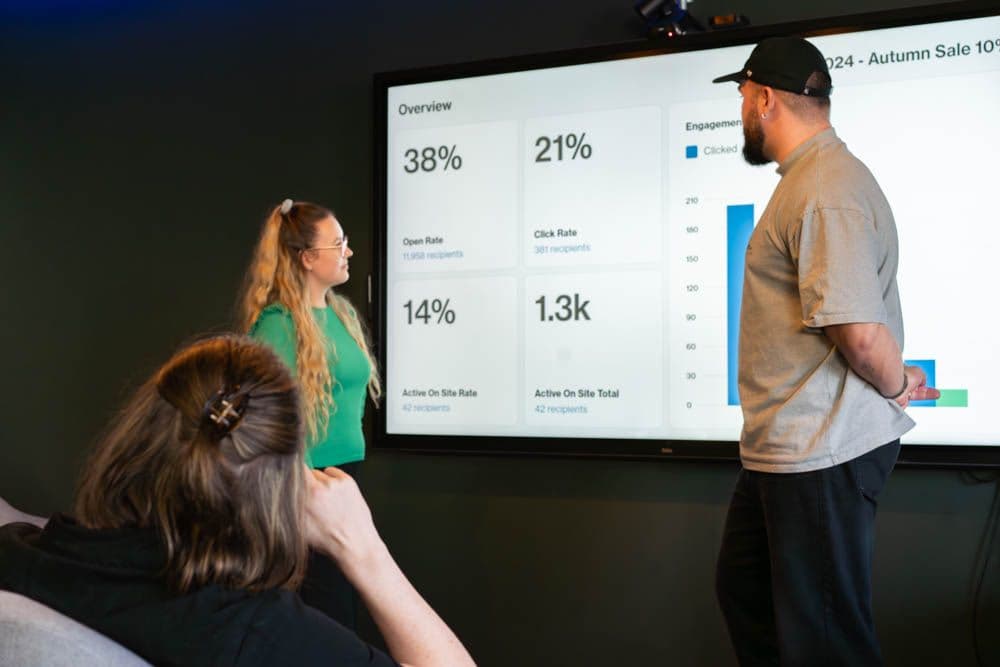
Klaviyo: Campaign opens, clicks, conversions, unsubscribes, and email-attributed revenue.
Google Ads / Meta Ads: Spend, ROAS, conversions – all in context with your broader performance.
This lets you analyse your marketing performance across channels in one unified view – rather than hopping between multiple reports and interfaces.
Granular vs overview-level insight
Good dashboards work on two levels:
C-suite overview: One-page view of your core KPIs – revenue, traffic, ROAS, top-performing channels.
Marketing deep-dive: Campaign-level performance, email open rates by segment, abandoned cart trends, keyword-level search data, and more.
In Looker Studio, you can design your reports to scale from “at a glance” to “under the hood” – using interactive filters, drop-down selectors, and user-controlled time ranges.
Real-time, interactive, and always on
Forget about screenshots or PDFs. Looker Studio reports are:
Interactive: Users can filter data live by date, channel, location, or campaign.
Live: Your dashboard refreshes automatically as data updates in GA4, Shopify, or Klaviyo.
Sharable: Secure, view-only links mean you can send a real-time dashboard to your MD or marketing team with zero barriers.
You can even create multiple pages or tabs to keep things organised – e.g., a tab for ecommerce, one for email marketing, and another for ad spend tracking.
Common use cases we help clients with
At Newwave, we use Looker Studio to support a wide range of data-driven strategies. For example:
Ecommerce brands integrating Shopify and Klaviyo to understand their full customer journey – from click to conversion and repeat purchase.
Lead generation businesses using GA4 data to evaluate traffic quality by channel and optimise ad spend accordingly.
Multi-channel retailers unifying Google Ads, Meta Ads, and web analytics to assess return on investment across campaigns.
Each dashboard we build is custom – based on the client’s KPIs, reporting needs, and the decisions they want to drive.
Tips for getting the most from Looker Studio
Define your KPIs first. Don’t build a dashboard without clarity on what success looks like.
Use calculated fields. Create custom metrics like conversion rates or blended ROAS.
Keep it scannable. Prioritise clean design, simple charts, and clear labelling.
Automate weekly/monthly updates. Set up email delivery of dashboard snapshots to key stakeholders.
Link dashboards to strategy. Tie each metric back to a goal – awareness, engagement, acquisition, retention, or revenue.
Looker Studio isn’t just a data visualisation tool
When plugged into GA4, Shopify, Klaviyo and other platforms, it gives your team the confidence to act quickly, optimise campaigns, and prove ROI with clarity.
Looking to set up a custom reporting solution that actually tells you what’s working? Speak to our team about bespoke Looker Studio dashboards that make your data make sense.